If you've ever tried to write code, edit spreadsheets, or design anything on a single laptop screen, you know the frustration. Constantly switching between windows. Squinting at tiny text. Losing track of your reference material. It's exhausting.
Viewport solves this with two extra 14-inch 1080P displays that attach directly to your laptop. No desk required. No external power needed. Just plug in via USB-C or HDMI and you instantly have triple the screen space.
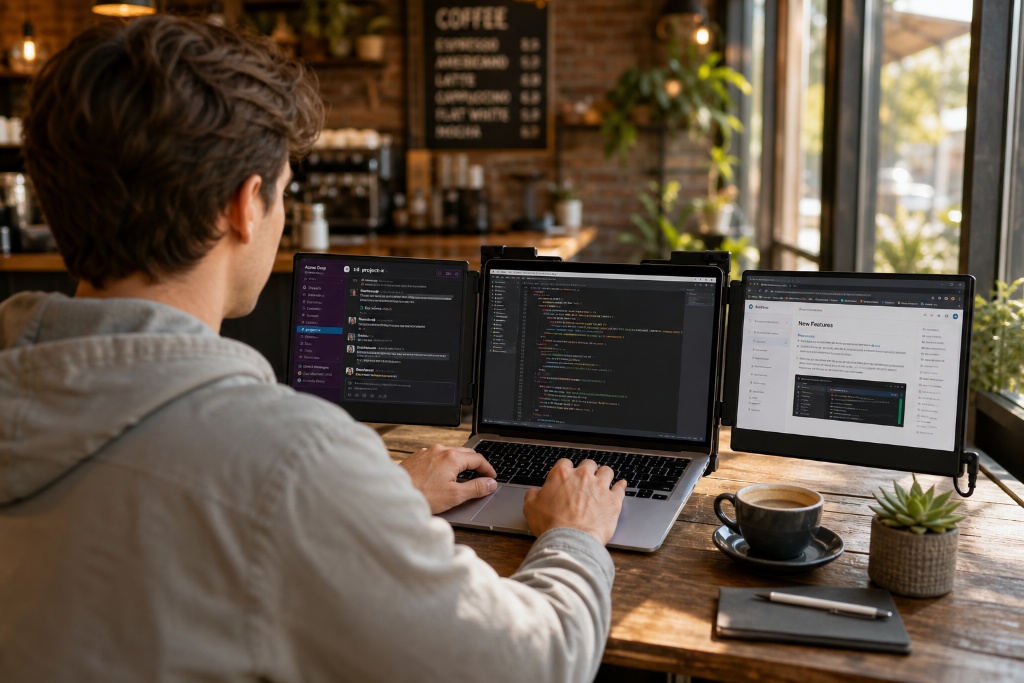
Unlike heavy desktop monitors, Viewport weighs just 2 pounds and folds completely flat. Toss it in your laptop bag and take your entire workstation to the coffee shop, airport lounge, or hotel room. When you're done, fold it back up in seconds.
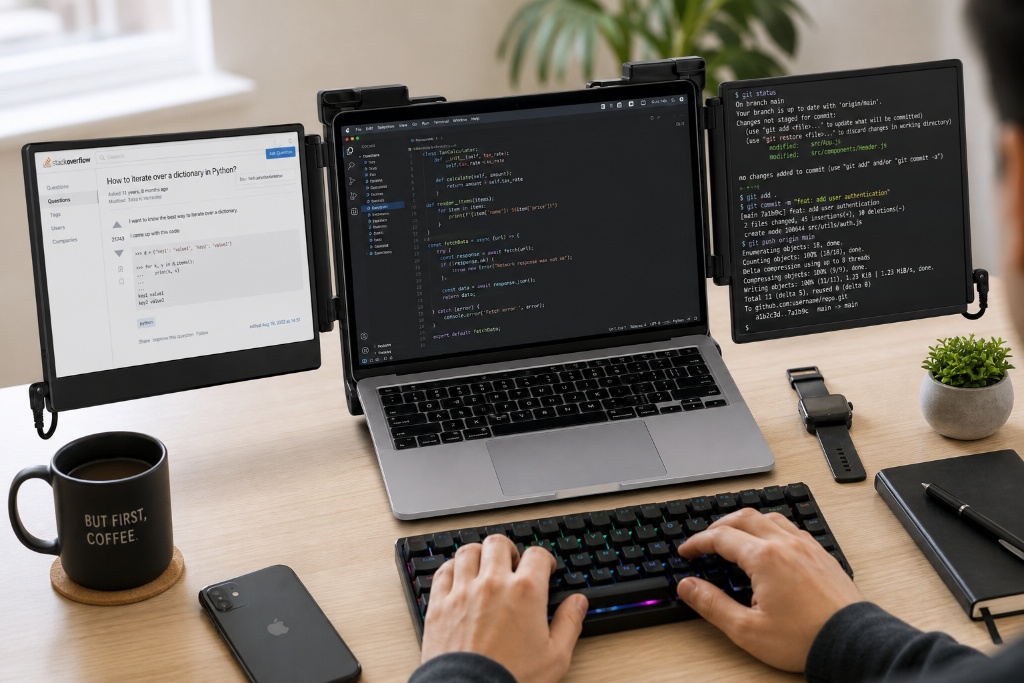
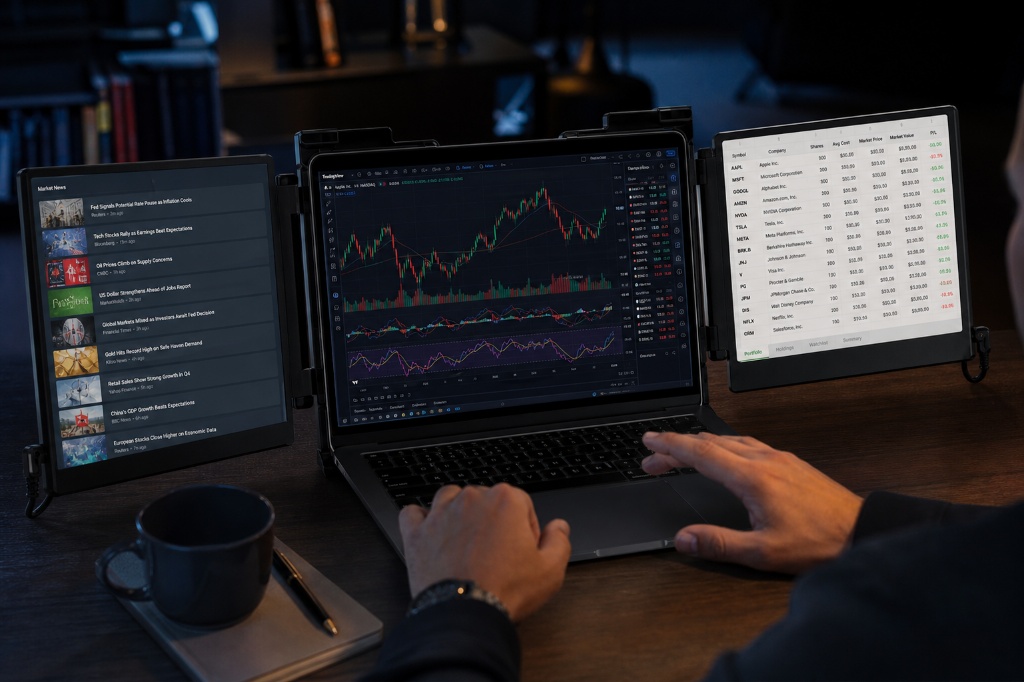
Whether you're coding with docs on one screen, debugging on another, and running tests on the third—or trading stocks while monitoring news and charts—Viewport gives you the screen real estate of a desktop setup in a package that travels anywhere.
Coffee shops. Airport lounges. Hotel rooms. Bring your full three-monitor setup anywhere your laptop goes. No desk required.
Stop alt-tabbing between windows. Keep your code, docs, and Slack visible simultaneously. Studies show dual monitors increase productivity by 42%—triple monitors do even more.
Plug in USB-C or HDMI and you're done. No drivers to install, no software to configure. Works instantly with Mac, Windows, Linux, and Chrome OS.
We're a small team of remote software developers who got tired of choosing between two bad options: either cram everything onto a single 13-inch laptop screen, or lug a heavy external monitor through airports and coffee shops.
We tried the "portable monitor" route—those single add-on screens. Better than nothing, but still limiting. We wanted the full three-monitor desktop experience, just... portable. So we designed one ourselves.
After testing 47 prototypes (and countless iterations on weight, stability, and screen quality), we landed on Viewport: a triple-screen setup that actually fits in a laptop bag, powers from your laptop's USB-C port, and doesn't wobble when you're typing on a café table. It's what we use every day, and now we're making it available to anyone who's tired of squinting at one tiny screen.
Working remotely doesn't mean you should sacrifice productivity. Viewport gives you the screen real estate of an office desk setup while you're working from a coffee shop in Bali, a co-working space in Austin, or your kitchen table at home.
Keep your communication apps visible on one screen, your main work on the center laptop display, and reference materials or monitoring dashboards on the third screen. No more constant window-switching that breaks your flow.
Write code on your main screen, view documentation on the left, and debug console output on the right. Or design in Figma while keeping your style guide visible and Slack open for client feedback—all without alt-tabbing.
The 1080P IPS displays deliver crisp text rendering (critical for reading code) and accurate colors (essential for design work). And when you need to move to a different room or take your work to a client meeting, just fold it up and go.
Day traders, financial analysts, and data scientists need eyes on multiple streams simultaneously. Viewport lets you monitor live charts on one screen, track news feeds on another, and execute trades or build models on your laptop's main display.
The extra screen space means you catch opportunities faster and spot patterns you'd miss when constantly switching tabs. And if you trade from different locations throughout the day, Viewport travels with you—no need to reconstruct your workspace every time you move.
| Feature | Viewport | Mobile Pixels Duex | Generic Amazon Triple Screen |
|---|---|---|---|
| Number of Screens | ✓ 3 screens (triple display) | 2 screens (dual display) | ✓ 3 screens |
| Price | ✓ $149.99 | $249+ (more expensive) | ✓ $139 (cheaper but...) |
| Build Quality | ✓ Aluminum frame (stable, premium) | Plastic frame (lightweight but flimsy) | Plastic frame (wobbly, cheap feel) |
| Screen Rotation | ✓ 235° adjustable (portrait/landscape) | 180° only (limited positioning) | Fixed angle (no adjustment) |
| Setup Time | ✓ Plug & play (instant) | ✓ Plug & play | Requires driver install (Mac issues) |
| Weight | ✓ 2.0 lbs (portable) | ✓ 1.6 lbs (lightest) | 2.5 lbs (heaviest) |
| Warranty & Support | ✓ 30-day money-back + email support | ✓ 1-year warranty | 90-day warranty, no real support |
| Color Accuracy | ✓ IPS panel, 72% NTSC (good for design) | ✓ IPS, similar color | TN panel (washed out colors) |
Game changer for working from coffee shops. I went from cramming everything on one 13-inch screen to having a full three-monitor setup I can pack in my backpack. The screens are bright and crisp—no color shifting when I tilt them. Setup took literally 10 seconds. Worth every penny.
I'm a software developer and this has transformed my workflow. Code on the main screen, docs on the left, terminal output on the right. I can see everything at once now. The aluminum build feels solid—doesn't wobble when I'm typing. Highly recommend for anyone who codes on the go.
As a graphic designer, I was skeptical about color accuracy on portable monitors. Viewport surprised me—colors look great and the IPS panels maintain consistency from different viewing angles. I use it for client presentations and on-site work. Folds up nicely in my messenger bag.
Really solid product for day trading. I can monitor three different charts simultaneously without alt-tabbing. Only reason it's not 5 stars is the screens could be slightly brighter in direct sunlight. But for indoor use (which is 95% of my work), they're perfect. Great investment.
Grad student here. This has been a lifesaver for research and writing. I keep my paper draft on the main screen, reference materials on one side, and notes/citations on the other. My productivity has honestly doubled. Can't imagine going back to a single screen now.
I stream on Twitch part-time and needed a portable solution for streaming from different locations. Viewport lets me monitor chat, OBS, and my gameplay all at once. The USB-C power draw doesn't drain my laptop battery as fast as I expected. Super happy with this purchase.
Email us at support@bscproducts.ca — we respond within 24 hours, Monday through Friday.
Triple your workspace. Boost your productivity. Travel anywhere. Backed by a 30-day money-back guarantee.